Billing and payments on Tribely are managed through Stripe , a secure and trusted payment gateway. Administrators are required to connect a Stripe account to enable payment processing for memberships and subscriptions.
Adding Stripe card details is a mandatory step to activate billing features and publish your site on your Tribely account.
Understanding the Role of the Stripe Card
It is important to note that the Stripe card connected to the admin account is not used by the administrator to make payments to the platform.
Instead, this card and Stripe connection are used to receive and process payments made by members , such as:
- Membership fees
- Subscription payments
- Any other member-related charges
How payments work:
- Members make payments during registration or subscription.
- Stripe securely processes the transaction.
- The payment amount is deposited into the administrator’s connected Stripe account.
- The administrator does not use this card to pay Tribely.
In simple terms:
Member pays → Stripe processes the payment → Funds are deposited to the admin’s account
Why Adding Stripe Card Details Is Required
Connecting Stripe and adding card details is essential to:
- Enable membership and subscription payments
- Receive funds paid by members
- Complete account setup
- Publish and activate your site
Without completing this step, payment processing and site publishing will remain unavailable.
Adding Stripe Card Details to the Admin Account
Navigation Path
Members → Member Payment → Connect with Stripe
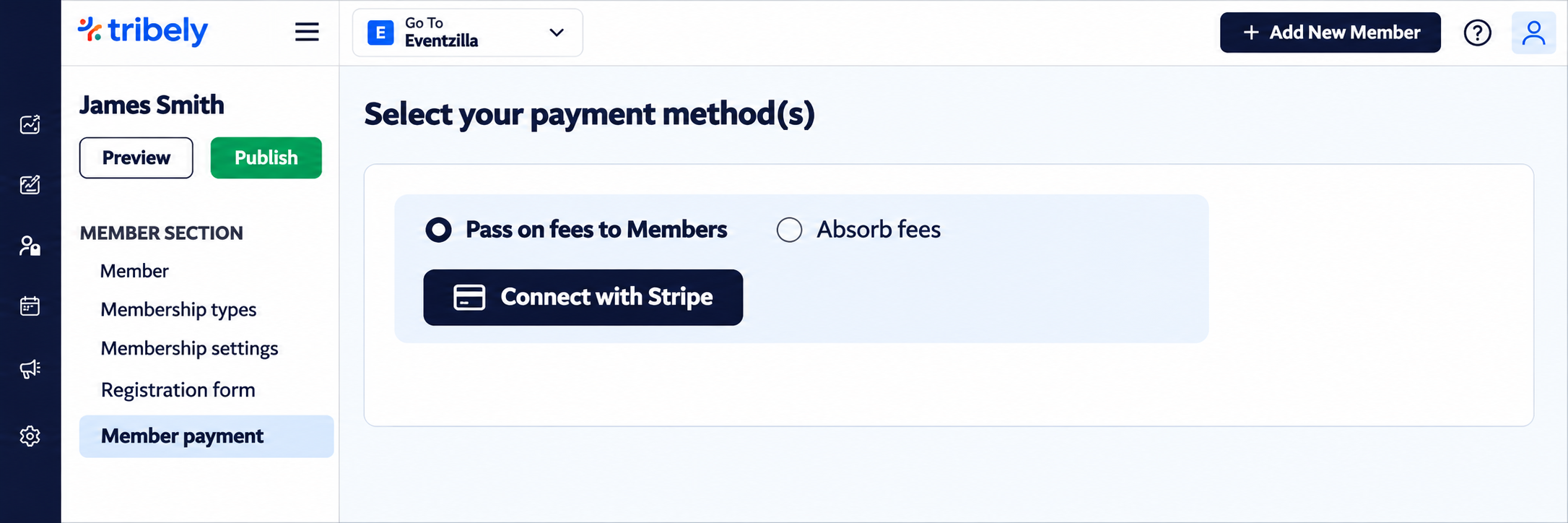
Steps to Connect Stripe
Access Member Payment Settings
Log in to your admin dashboard and navigate to Members → Member Payment. Click on Connect with Stripe.
Log in your Stripe account to Complete Stripe Authentication (OAuth)
You will be redirected to Stripe to complete the secure OAuth authentication process. This ensures that your payment details are handled safely and securely by Stripe.
Successful Connection
Once authentication is successful, you will be automatically redirected back to your account. The connected Stripe details will be displayed, confirming that the card has been successfully added.
Save Changes
Click Save Changes to finalize the setup.
- Stripe is used to securely process and deposit payments made by members.
- The connected card is for receiving member payments , not for admin-to-platform payments.
- Adding Stripe card details is required to publish your site and enable billing.
- Once connected, your account is ready to handle subscriptions and payments seamlessly.