Your dashboard is the central hub for managing all your membership activities. It gives you a real-time overview of your organization’s performance, quick access to essential tools, and shortcuts to key actions—everything you need, all on one screen.
From tracking member growth to monitoring revenue and promoting your membership site, the dashboard is designed to help you stay informed and take action quickly.
Overview Metrics
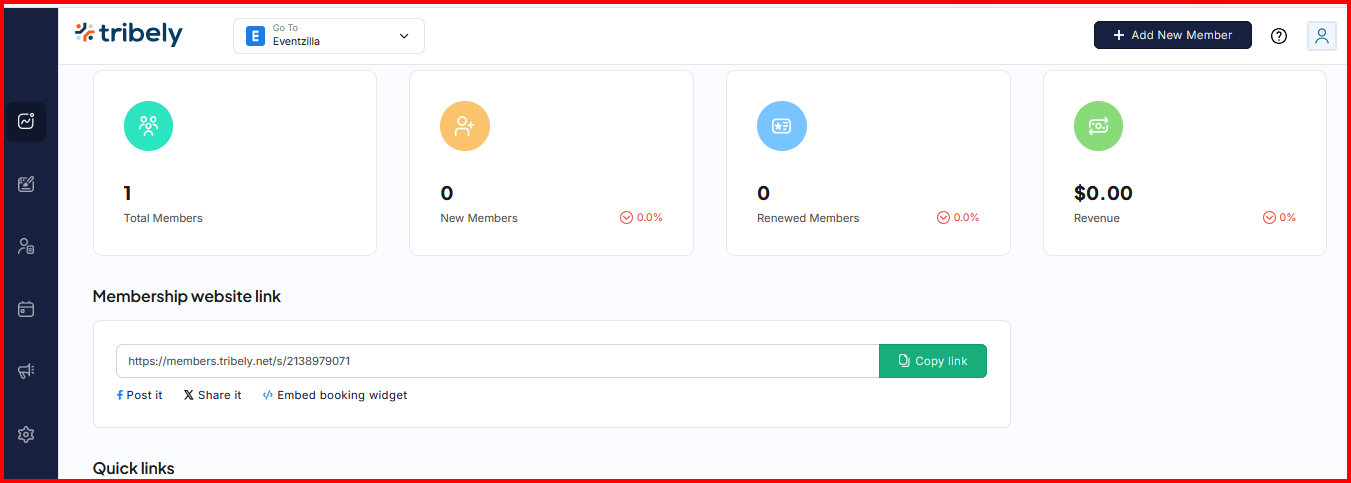
At the top of the dashboard, you’ll see a set of summary cards that highlight your organization’s key performance metrics. These provide a snapshot of how your membership and revenue are performing at a glance.
Key Metrics Displayed
- Total Members
Shows the total number of active members currently associated with your organization.
- New Members
Displays the number of new member sign-ups within the selected time period, helping you track recent growth.
- Renewed Members
Indicates how many members have renewed their memberships during the chosen timeframe.
- Revenue
Summarizes total earnings generated from memberships, renewals, and any add-ons or related purchases.
Time-Based Filters
You can adjust the date range to view performance data for:
- All time
- Last 7 days
- Last 30 days
- Last 60 days
These filters allow you to analyze short-term activity or long-term trends based on your needs.
Membership Website Link and Sharing Options
The dashboard includes a dedicated section for your membership website link, making it easy to promote and share your program.
What You Can Do
- Copy your membership website link with a single click
Share your membership page directly on:
* Facebook (Meta)
* X (formerly Twitter)
- Embed the booking widget on your existing website to allow visitors to sign up without leaving your site
These options ensure your membership program is always accessible and simple to promote across different channels.
Quick Access Links
To streamline everyday tasks, the dashboard provides quick links to frequently used sections. These shortcuts help you manage your organization efficiently without navigating through multiple menus.
Build Your Website
Create and manage a professional, branded website for your membership program.
You can customize layouts, colors, and content to match your organization’s identity and present a polished online presence.
Manage Your Members
Access all member-related information from one place. From this section, you can:
- View, add, or edit member profiles
- Track member status, activity, and renewals
- Monitor engagement levels
You can also configure automated transactional emails, including:
- Welcome emails
- Renewal reminders
- Payment confirmations
This helps reduce manual follow-ups and ensures timely communication with members.
Monetize and Grow
This section focuses on financial performance and growth opportunities. Here, you can manage:
- Membership plans
- Orders and payments
- Discount codes and promotional offers
It provides a clear view of how your membership program is generating revenue and where you can optimize growth.
Managing Events at Your Organization
If your organization hosts events such as workshops, conferences, or meetups, you can integrate seamlessly with Eventzilla for event management.
With this integration, you can:
- Offer member-only ticket types and exclusive discounts
- Track member participation and engagement across events
- Encourage renewals through targeted event-based follow-ups
This ensures a smooth and unified experience for both organizers and members—without the need to manage multiple platforms.
What the Dashboard Helps You Do
Your dashboard is designed to help you:
- Stay informed with real-time membership and revenue insights
- Access essential tools quickly and efficiently
- Promote your membership website with ease
- Grow and engage your community using data-driven insights and events